Your clients change nothing. TROY takes care of the work in between.
Documents come in just as they do today. TROY reads them and only puts in front of you what needs your judgement.
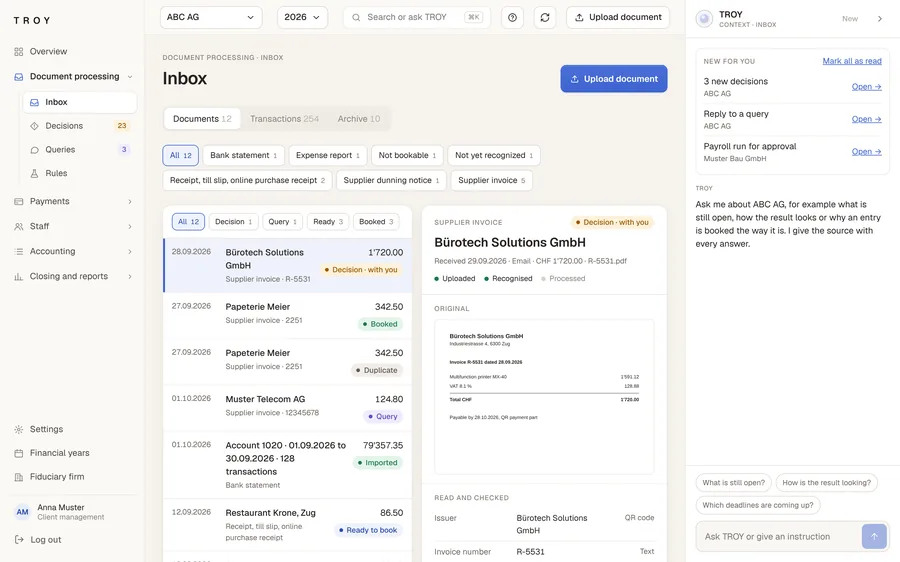
How a document travels through TROY
Documents arrive
Everything your client already sends you lands in TROY's inbox for that client.
- Invoices and receipts as PDF or photo
- Bank statements (camt, CSV, Excel, PDF)
- Credit cards, TWINT and SumUp
TROY processes
TROY reads every field and records where each value comes from and how certain it is.
- Clear: TROY books
- Something missing: TROY asks the client
- Judgement needed: you decide, with a suggestion
The books add up
Everything goes into the client's journal, with its document and source.
- Bank and card reconciliation
- Quarterly VAT return
- Reports and year-end closing
Better to ask than to book it wrong.
Once TROY has read a document, it decides what happens next. Choose a document from the list.
Your decision becomes a rule.
When you decide a case, you can specify that cases of the same kind are booked the same way in future. The rule starts cautiously: at first, TROY only makes suggestions. Only once the rule has proven itself does TROY book on its own. You can see and change every rule under “Rules”.
- Rules apply per client and chart of accounts.
- Nothing is ever booked automatically without a document.
- Every automatic entry is logged, together with the rule that was applied.
Try it out: confirm TROY's suggestions for the next Swisscom invoices.
A new client in three steps.
Bringing a client over to TROY should take as little effort as possible. TROY asks for what it needs step by step and fetches the details itself. You check and confirm.
- Legal form
- Company limited by shares
- UID
- CHE-123.456.789
- Registered office
- Lucerne
- Purpose
- Building and civil engineering, conversions and renovations
- Industry
- Construction
- PDFFinancial statements 2025.pdfFinancial statements
- XLSTrial balance 31.12.2025.xlsx84 accounts
- XLSOpen items payables.xlsx12 open invoices
- CSVAccount ledgers 2023 to 2025.csv5'214 entries
- Opening balance sheet balances
- Bank 1020 matches the statement
- Open items match the accounts
- VAT method chosen
TROY accepts documents before everything is set up and books them as soon as the details are there.
A list of names or UID numbers is enough. TROY creates the clients and shows what is still missing for each one.
Before the first entry, TROY checks that the opening balance sheet, bank statements and open items match.
Whatever is still missing goes on a checklist. You add it when it suits you and work with TROY in the meantime.